FITS
仕様
FITSは Flexible Image Transport System (柔軟な画像転送システム)の略で、NASAなどの専門の科学者が使用する標準天文データ形式です。FITSは(JPGやTIFFなどの)画像形式以上のもので、主に多次元配列からなる科学データを保存するために設計されています。
A FITS file consists of one or more header and data units (HDUs), with the first HDU referred to as the "primary HDU" or "primary array." Five primary data types are supported: 8-bit unsigned bytes, 16 and 32-bit signed integers, and 32 and 64-bit single and double-precision floating-point reals. The FITS format can also store 16 and 32-bit unsigned integers.
Each header unit consists of any number of 80-character keyword records which have the general form:
KEYNAME = value / comment string
The keyword names may be up to 8 characters long and can only contain uppercase letters, the digits 0-9, the hyphen, and the underscore character. The keyword name is (usually) followed by an equals sign and a space character (= ) in columns 9 - 10 of the record, followed by the value of the keyword which may be either an integer, a floating point number, a character string (enclosed in single quotes), or a boolean value (the letter T or F).
The last keyword in the header is always the END keyword which has no value
or comment fields.
Each header unit begins with a series of required keywords that specify the size and format of the following data unit. A 2-dimensional image primary array header, for example, begins with the following keywords:
SIMPLE  =                    T / file does conform to FITS standard
BITPIX  =                   16 / number of bits per data pixel
NAXIS   =                    2 / number of data axes
NAXIS1  =                  440 / length of data axis 1
NAXIS2  =                  300 / length of data axis 2
注釈
In Siril, 64-bit FITS files are not supported. Siril reads them but converts them to 32-bit files.
ファイル名
FITS files should have an extension ".fit", ".fits" or ".fts"; uppercase variations are accepted but not recommended. It is possible to select your preferred extension in the Preferences dialog, and this will be used for saving FITS files, but all permitted extensions will be accepted for reading FITS images or sequence frames.
警告
The FITS file library cfitsio interprets square brackets in filenames as providing filtering options. Therefore regardless of whether square bracket characters are permitted in filenames by your operating system, they must not be used in FITS files.
圧縮
圧縮とは、画像のサイズを小さくする方法です。圧縮方式は、使用する画像の種類によってさまざまです。この圧縮には、JPEGのように破壊的なものと、PNGで提案されているような可逆的なものがあります。
圧縮されたFITSファイルを扱うことが可能です。計算時間が長くなる代わりに、画像のサイズを大幅に縮小できます。Sirilは以下の圧縮アルゴリズムを提供しています:
Rice: Riceアルゴリズムは単純で非常に高速です
GZIP 1: The gzip algorithm is used to compress and uncompress the image pixels. Gzip is the compression algorithm used in the free GNU software utility of the same name.
GZIP 2: The bytes in the array of image pixel values are shuffled into decreasing order of significance before being compressed with the gzip algorithm. This is usually especially effective when compressing floating-point arrays.
One option is associated to these algorithms, the Quantization level:
While floating-point format images may be losslessly compressed (using gzip, since Rice only compresses integer arrays), these images often do not compress very well because the pixel values are too noisy; the less significant bits in the mantissa of the pixel values effectively contain incompressible random bit patterns. In order to achieve higher compression, one needs to remove some of this noise, but without losing the useful information content. If it is too large, one undersamples the pixel values resulting in a loss of information in the image. If it is too small, however, it preserves too much of the noise (or even amplifies the noise) in the pixel values, resulting in poor compression.
注釈
The supported image compression algorithms are all loss-less when
applied to integer FITS images; the pixel values are preserved exactly with
no loss of information during the compression and uncompression process.
Floating point FITS images (which have BITPIX = -32 or -64) are
first quantized into scaled integer pixel values before being compressed.
This technique produces much higher compression factors than simply using
GZIP to compress the image, but it also means that the original floating
value pixel values may not be precisely returned when the image is
uncompressed. When done properly, this only discards the 'noise' from the
floating point values without losing any significant information.
科学用FITSファイルの特殊なケース
NASAのハッブル宇宙望遠鏡(HST)やジェームズ・ウェッブ宇宙望遠鏡(JWST)など、主要な天文観測ミッションによって生成されるFITSファイルは、アマチュア天文学者が通常使用するFITSファイルよりも複雑な場合が多いです。これらのファイルは一般的にFITSシーケンス(FITSキューブとも呼ばれます)として構成されていますが、重要な違いが1つあります。それは、これらのシーケンスに含まれる個々の画像のサイズが異なる場合があるという点です。
This feature allows for storing multi-dimensional data collected under varying conditions, where each frame or image in the sequence might not have the same resolution or size. For example, data from the JWST often involves such heterogeneous datasets due to the nature of its instruments and observing modes.
Sirilでは、この種の科学用FITSファイルを処理する際、FITSキューブ内で異なるサイズの画像を扱えるようにするオプションを有効にすることが極めて重要です。これを行なうには、環境設定の FITSオプション タブで、FITSキューブに異なるサイズの画像を含めることを許可する オプションを選択します。
警告
Currently, Siril is unable to process FITS files with NAXES[2] > 3. This
feature is planned for future versions of the software, so FITS cubes with
more than three axes are not supported at the moment.
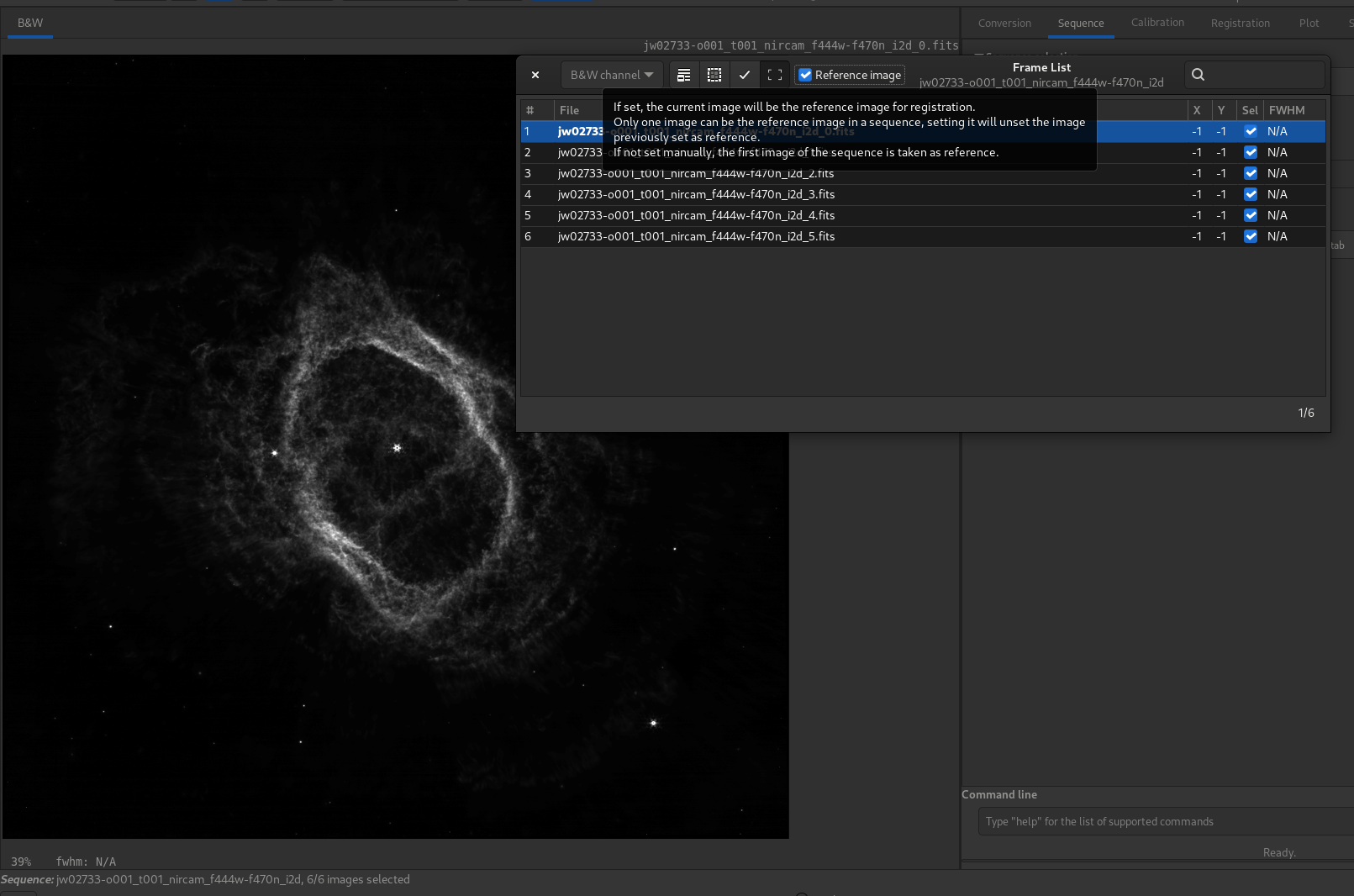
Sirilに読み込まれたJWST画像の例
FITS画像の向き
The FITS standard is a container that describes how to store image data and metadata. Professional tools, from the early age of the FITS format, like ds9 (Harvard Smithsonian Center for Astrophysics), fv (FITS viewer from NASA), store images bottom-up. We might be tempted to say that it does not really matter, but when demosaicing or astrometry is involved, problems arise. For example, the usual RGGB Bayer pattern becomes GBRG if the image is upside-down.
Nowadays, despite this, most camera drivers are writing data in the top-down order and we have to cope with it.
For these reasons, we recently have introduced, together with P. Chevalley of CCDCiel, a new FITS keyword. We encourage all data producers, INDI and ASCOM developers, to use it in order to make things easier for everybody.
This keyword is ROWORDER of type TSTRING. It can take two values:
BOTTOM-UP and TOP-DOWN.
Siril will always read and display images in the bottom-up order, however if the top-down information is specified in the keyword, then Siril will demosaic the image with the corrected pattern.
Why would some programs write images bottom-up in the first place?
The reason is: mathematics do it that way.
Also, the FITS specification says:
5.1. Image display conventions
It is very helpful to adopt a convention for the display of images transferred via the FITS format. Many of the current image processing systems have converged upon such a convention. Therefore, we recommend that FITS writers order the pixels so that the first pixel in the FITS file (for each image plane) be the one that would be displayed in the lower-left corner (with the first axis increasing to the right and the second axis increasing upwards) by the imaging system of the FITS writer. This convention is clearly helpful in the absence of a description of the world coordinates. It does not preclude a program from looking at the axis descriptions and overriding this convention, or preclude the user from requesting a different display. This convention also does not excuse FITS writers from providing complete and correct descriptions of the image coordinates, allowing the user to determine the meaning of the image. The ordering of the image for display is simply a convention of convenience, whereas the coordinates of the pixels are part of the physics of the observation.
警告
ROWORDER keyword can be used for:
Displaying the image with the intended orientation (unflip the display).
Unflip the Bayer demosaic pattern. So the demosaic pattern can be specified conform the sensor supplier.
BUT
ROWORDERshall not be used to unflip the image data for stacking. Otherwise new images would become incompatible with older darks and flats.ROWORDERshall not be used to unflip the image data for astrometric solving. This would make the astrometric solution incompatible with other programs.
ROWORDER キーワードを利用するソフトウェア
Siril (バージョン0.99.4以降)
CCDCiel (バージョン0.9.72以降)
KStars (3.4.3以降)
SharpCap (バージョン3.3以降)
FireCapture (バージョン2.7以降)
N.I.N.A (バージョン1.10以降)
MaxImDL (バージョン6.23以降)
PixInsight (バージョン1.8.8-6以降)
ASTAP (バージョンß0.9.391以降)
APT (バージョン3.86.3以降)
AstroDMx Capture (バージョン0.80以降)
Astroart (バージョン8.0以降)
Retrieving the Bayer matrix
Image row order changes the way the Bayer matrix should be read, but there are
also two optional FITS header keywords that have an effect on this: XBAYROFF
and YBAYROFF. They specify an offset to the Bayer matrix, to start reading
it on first column or first row.
To help developers integrating the ROWORDER, XBAYROFF and YBAYROFF
keywords in their software, some test images were created by Han Kleijn from
hnsky.org, one for each combination of the three
keywords. Download them here: Bayer_test_pattern_v6.tar.gz.
FITSキーワード一覧
Sirilは、幅広いキーワードを読み取り、解釈することができます。以下のリストは、必要に応じてSirilが認識する非標準のキーワードを示しています。Sirilが読み取るキーワードの中には、このリストに記載されていないものもあります。例えば、センサーの温度を示すキーワード CCDTEMP や TEMPERAT は正しく読み取られますが、キーワード CCD-TEMP として処理されます。
Tip
Sirilは、FITSヘッダーにチェックサムが存在する場合、それを読み取って比較することができます。ただし、デフォルトでは、ソフトウェアのパフォーマンス上の理由から、ファイルを開く際にHDUヘッダーから CHECKSUM および DATASUM カードが自動的に削除され、HDUをファイルに書き込む際には、ヘッダーから CHECKSUM または DATASUM カードがすべて削除されます。ただし、save コマンドの -chksum オプションを使用するか、グラフィカルユーザーインターフェースを介して、ユーザーの要求に応じてこれらを保存することは可能です。
FITSキーワード |
型 |
コメント |
|---|---|---|
BZERO |
Double |
Offset data range to that of unsigned short |
BSCALE |
Double |
Default scaling factor |
MIPS-HI |
Unsigned short |
Upper visualization cutoff |
MIPS-LO |
Unsigned short |
Lower visualization cutoff |
MIPS-FHI |
Float |
Upper visualization cutoff |
MIPS-FLO |
Float |
Lower visualization cutoff |
PROGRAM |
String |
Software that created this HDU |
FILENAME |
String |
Original Filename |
DATE |
String |
UTC date that FITS file was created |
DATE-OBS |
String |
YYYY-MM-DDThh:mm:ss observation start, UT |
IMAGETYP |
String |
Type of image |
ROWORDER |
String |
Order of the rows in image array |
EXPTIME |
Double |
[s] Exposure time duration |
TELESCOP |
String |
Telescope used to acquire this image |
OBSERVER |
String |
Observer name |
FILTER |
String |
Active filter name |
APERTURE |
Double |
Aperture of the instrument |
ISOSPEED |
Double |
ISO camera setting |
FOCALLEN |
Double |
[mm] Focal length |
CENTALT |
Double |
[deg] Altitude of telescope |
CENTAZ |
Double |
[deg] Azimuth of telescope |
XBINNING |
Unsigned int |
Camera binning mode |
YBINNING |
Unsigned int |
Camera binning mode |
XPIXSZ |
Double |
[um] Pixel X axis size |
YPIXSZ |
Double |
[um] Pixel Y axis size |
INSTRUME |
String |
Instrument name |
CCD-TEMP |
Double |
[degC] CCD temperature |
SET-TEMP |
Double |
[degC] CCD temperature setpoint |
GAIN |
Unsigned short |
Sensor gain |
OFFSET |
Unsigned short |
Sensor gain offset |
CVF |
Double |
[e-/ADU] Electrons per A/D unit |
BAYERPAT |
String |
Bayer color pattern |
XBAYROFF |
Int |
X offset of Bayer array |
YBAYROFF |
Int |
Y offset of Bayer array |
FOCNAME |
String |
Focusing equipment name |
FOCPOS |
Int |
[step] Focuser position |
FOCUSSZ |
Int |
[um] Focuser step size |
FOCTEMP |
Double |
[degC] Focuser temperature |
STACKCNT |
Unsigned int |
Stack frames |
LIVETIME |
Double |
[s] Exposure time after deadtime correction |
EXPSTART |
Double |
[JD] Exposure start time (standard Julian date) |
EXPEND |
Double |
[JD] Exposure end time (standard Julian date) |
OBJECT |
String |
Name of the object of interest |
AIRMASS |
Double |
Airmass at frame center (Gueymard 1993) |
SITELAT |
Double |
[deg] Observation site latitude |
SITELONG |
Double |
[deg] Observation site longitude |
SITEELEV |
Double |
[m] Observation site elevation |
DFTTYPE |
String |
Module/Phase of a Discrete Fourier Transform |
DFTORD |
String |
Low/High spatial freq. are located at image center |
DFTNORM1 |
Double |
Normalisation value for channel #1 |
DFTNORM2 |
Double |
Normalisation value for channel #2 |
DFTNORM3 |
Double |
Normalisation value for channel #3 |
CTYPE3 |
String |
RGB image |
OBJCTRA |
String |
Image center Right Ascension (hms) |
OBJCTDEC |
String |
Image center Declination (dms) |
RA |
Double |
Image center Right Ascension (deg) |
DEC |
Double |
Image center Declination (deg) |
CTYPE1 |
String |
TAN (gnomic) projection |
CTYPE2 |
String |
TAN (gnomic) projection |
CUNIT1 |
String |
TAN (gnomic) projection + SIP distortions |
CUNIT2 |
String |
TAN (gnomic) projection + SIP distortions |
EQUINOX |
Double |
Equatorial equinox |
CRPIX1 |
Double |
Axis1 reference pixel |
CRPIX2 |
Double |
Axis2 reference pixel |
CRVAL1 |
Double |
Axis1 reference value (deg) |
CRVAL2 |
Double |
Axis2 reference value (deg) |
LONPOLE |
Double |
Native longitude of celestial pole |
CDELT1 |
Double |
X pixel size (deg) |
CDELT2 |
Double |
Y pixel size (deg) |
PC1_1 |
Double |
Linear transformation matrix (1, 1) |
PC1_2 |
Double |
Linear transformation matrix (1, 2) |
PC2_1 |
Double |
Linear transformation matrix (2, 1) |
PC2_2 |
Double |
Linear transformation matrix (2, 2) |
CD1_1 |
Double |
Scale matrix (1, 1) |
CD1_2 |
Double |
Scale matrix (1, 2) |
CD2_1 |
Double |
Scale matrix (2, 1) |
CD2_2 |
Double |
Scale matrix (2, 2) |
PLTSOLVD |
Logical |
Siril solver |