スクリプト
この節では、Sirilで利用可能なさまざまなスクリプトと自動化の方法について説明します。
Tip
Python スクリプトは 1.3.5 開発バージョンで導入されました。現在は EXPERIMENTAL と表示されています。これはあなたのデータを食ってしまうという意味ではありません: インタフェース自体は堅牢で、開発を通じてテストされています: 現在の実験的な性質は、ユーザーがこの新しい機能を使って何をするかまだわからないという事実と、おそらくパッケージングの制約や異なるオペレーティングシステム間での一貫性のために、私たちが予見していない問題や制限があるかもしれないという事実のためです。
スクリプトリポジトリで公開されているスクリプトを使用してユーザーとして、あるいはスクリプトライターとして、ぜひお試しください。私たちはあなたのフィードバックを歓迎し、1.4安定版シリーズと1.5開発版シリーズを通してインタフェースを改良することを目指します。
自身のPythonスクリプトを実行時にデバッグしたい場合は、 Pythonのデバッグモードを有効にする にチェックを入れてください。Pythonプロセスにアタッチする手順を詳しく説明したチュートリアルが Siril tutorial page にあります。
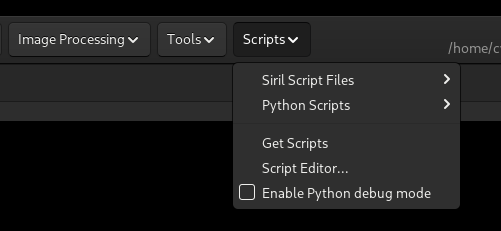
スクリプトメニュー
警告
すべてのスクリプトがSiril開発チームによって書かれたものでもなければ、Siril開発チームの責任でもありません!
Pythonスクリプトの導入により、Sirilスクリプトライターが利用できる能力は非常に大きくなりました。大きな力には大きな責任が伴います!
あなた は、ユーザーとして、使用するスクリプトの作者を信頼することが必要です。1.4.0ではスクリプトリポジトリが導入されました。そこにあるスクリプトのいくつかはSiril開発チームによって書かれましたが、他のスクリプトはサードパーティの貢献者によって書かれました。スクリプト作者、エンドユーザー、スクリプトリポジトリのルールに関するガイダンスについては、主要情報節を読んでください。
スクリプトを入手
A small number of basic script files come packaged with Siril, however you can add more from the script repository. To do so, go to the Scripts menu -> Get Scripts. This will open the Scripts tab of the Preferences dialog. Here, below the list of local script directories, you will find a list of scripts in the repository.
The scripts can be sorted by category, script name, type or by whether or not they are selected.
As there may eventually be a large number of scripts, not all of which will be relevant to your workflow, you can configure the scripts you want to appear in the Scripts menu. Simply select the checkbox next to them and click Apply to update the menu.
Tip
You don't need to select scripts to appear in the menu for them to be usable with the
pyscript command: this will search all the local script directories as well as the
whole of the local scripts repository.
警告
Script authors may submit updates. Occasionally, inevitably, there may be a bad update that breaks the script for you. Bugs need to be reported to the script author: for scripts written by the Siril team you can report them at the scripts GitLab repository and for those written by third party contributors you should report them at the contact details in the script.
The script can be opened in the script editor by double clicking on it in the list. This is important for several reasons:
It allows you to find the details of the script author for bug reporting.
When you double click the script there is an option to revert to previous versions.
This means that if an update broke the script, you can open the previous version and save a local copy in one of your local script folders for use until the script author fixes the bad update. (The version saved in a local folder will take priority over a repository version with the same name, but it will appear in a different subfolder in the menu with the name of your local scripts folder.)