シーケンス
シーケンスとは、Sirilが処理済みのファイル群を表すために使用するもので、例えば、マスターダーク画像に変換するダーク画像のセットなどが挙げられます。これは、相互に関連付けが必要な大量のファイルを扱う上で、非常に便利なツールです。
2つ以上のFITSファイルの集合
Sirilは、FITS 画像に対して、ネイティブの32ビット浮動小数点データまたは16ビット符号なし整数データを使用します。その他の形式は自動的に変換されます。FITS画像がシーケンスとして認識・検出されるためには、ファイル名が以下の特定のパターンに従っていることが必要です:
basename$i.[ext]
basename には、ASCII文字であれば何でも指定できます。末尾に
_文字を付けるのが一般的で便利ですが、必須ではありません。これはシーケンス名として使用されます。$i は画像のインデックスです。正の整数でなければならず、先頭にゼロがいくつあってもかまいません。
[ext] は、設定 で説明されているように、サポートしている拡張子であり、デフォルトでは
fitです。
注釈
現在の作業ディレクトリ内のFITSシーケンスを検出するために使用される拡張子は、設定で指定された拡張子およびSirilによって作成されたファイルの拡張子と同じになります。
警告
一部のオペレーティングシステムでは、同時に開ける画像の数に制限があります。これは中央値スタック法や平均値スタック法を行なう際に必要となります。Windowsの場合、その制限は2048枚です。画像の数が非常に多い場合は、後述する別のシーケンス形式を使用することをお勧めします。
1つのSERファイル
SER は、複数の連続した画像の取得シーケンスを単一のファイルに格納するためのフォーマットです。これは比較的シンプルなフォーマットであり、FITSほど多くのメタデータを格納することはできませんが、単純なフィルムデータよりは多くの情報を保持でき、データは圧縮されません。SERファイルには、チャンネルあたり8ビットまたは16ビットの画像のみを格納できます。SERファイルには、ピクセルの内容に応じて、白黒、CFA、カラー(3チャンネル)の3種類があります。
注釈
SERファイルは、ファイル メニューの 開く から、または 画像シーケンスを検索 ボタンを使用して開くことができます。
SER形式の詳細や、非圧縮AVIなどの動画形式が天文学用途に適さない理由については、SER を参照してください。
警告
ある程度、AVIなどの一般的な動画ファイルやその他のコンテナ形式もサポートされています。動画ファイルのサポートはSER形式への移行に伴い廃止されつつありますが、Sirilで動画を開いて内容を調べたり、フレームを抽出したり、変換したりするのに役立つ場合があります。いくつかの操作は依然として可能ですが、サムスタッキングなど、他のシーケンスと比較して処理速度は遅くなります。完全な処理を行なう場合、制限や互換性の問題が生じる可能性があります。
1つのFITSファイル
注釈
FITSキューブやFITSシーケンスとも呼ばれ、Sirilでは略してFITSEQとも呼ばれます。
The FITS format is an image and science data container, it can contain several of these in a single file. We can use that to store an entire sequence of FITS images in a single file while preserving the FITS header of each image. It is the file format that professional astronomers use.
It's simpler to manage one file on the disk than 2000, but since it is a single file, some operations on single images of the sequence may not be possible. In particular, it is not currently supported within Siril to change the header of a single image.
This format is an alternative to SER for a single-file sequence, with 32 bits per channel and full header support.
シーケンスを読み込む

Sequence Search and Cleaning.
作業ディレクトリが適切な場所に設定され、FITSファイルの命名規則が正しく守られ、FITSファイルの拡張子も正しく設定されていることを確認したら、シーケンスタブの シーケンスを検索 ボタンをクリックしてください。フォルダ内に存在するすべてのシーケンスが一覧表示されたドロップダウンリストが開きます。見つかったシーケンスが1つだけの場合は、自動的に選択され、読み込まれます。
フレームセレクター
Sirilの大きな強みは、画像シーケンスを簡単に操作できることです。シーケンスを開くと、参照画像(下記参照)が表示されます。デフォルトでは、これが最初の画像になります。しかし、シーケンスを構成する個々の画像を確認したい場合もあるでしょう。これは、ツールバーの  ボタン、またはシーケンスタブの フレーム一覧を開く ボタンからアクセスできるフレームセレクターを使用することで可能です。
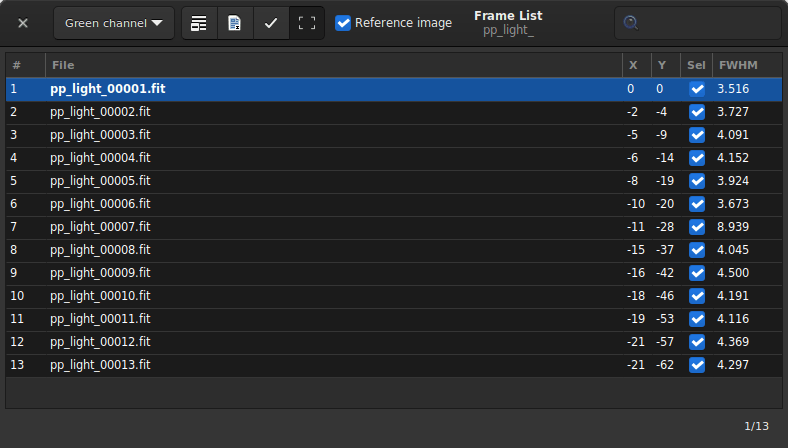
シーケンスからフレームを選択して表示したり、参照用として設定したり、除外したりできるフレームセレクター。
Tip
フレームセレクター内の画像にカーソルを合わせると、保存されている場合は元のファイル名が表示されます。
Clicking on an image in the list will load it and display it in the main area, while keeping the sequence as the active object for processing. More than just a image display selector, the tool can also be used to manually exclude images from the sequence, or visualize which are still included, visualize the values of image quality and shift between images if they have been computed, and change the reference image. Note that more image quality information can be viewed in the Plot tab.
Excluding an image from the sequence does not mean its data will be permanently deleted, it will just not be used for the subsequent processing operations, if instructed to do so. In most cases, the option to look for is called Process included images only.
The reference image is the image in the sequence that will serve as target for the registration and for the normalization. Other images will be transformed to look like the reference image, so it should be chosen carefully. Fortunately, since Siril 1.2, a new two-pass registration can automatically select the best image of the sequence as reference image before proceeding to image transformation.
The header bar of the window will provide many controls for these sequence properties:
The drop-down menu allows the channel for which registration data (quality, shifts) is displayed to be changed, if they exist for other channels.
The first button of the toolbar sets all images of the sequence as manually excluded.
The second one, sets them all as included.
The third includes or excludes the images selected from the list (multiple selections can be done with Ctrl or Shift) of the sequence.
The last button can be deactivated to hide the framing indicator over registered images.
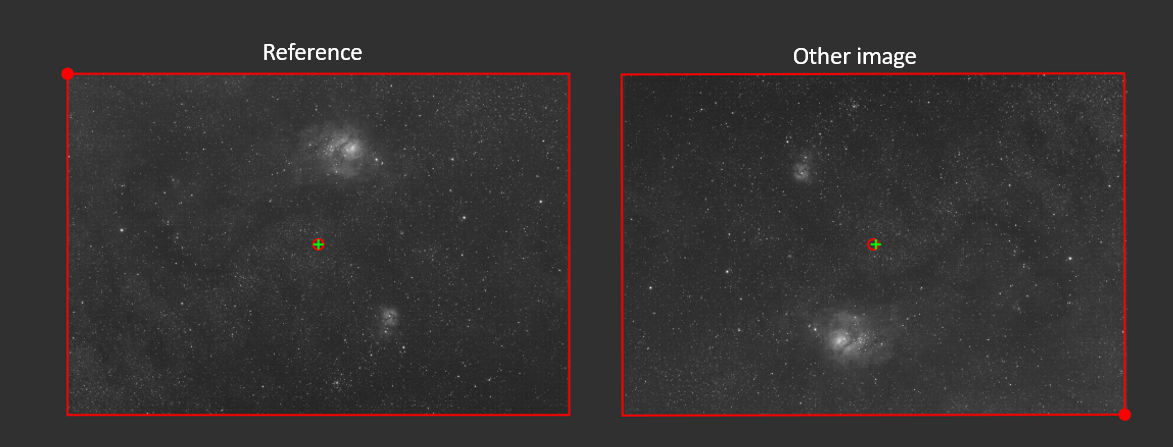
Framing indicator
The red frame shows the trace of the reference frame over each image of the sequence. The filled circle in one corner indicates the position of the top-left corner of the reference image. For instance, for the right image above, the framing indicator circle is at the bottom right, showing that there has been a meridian flip between this image and the reference shown on the left.
The red circle/green cross close to the center show the position of the center of the reference image and of the current image respectively. This enables to visualize the shift between the two images.
注釈
Since Siril 1.3.1, the color of the framing indicator is different whether the registration information is just pure shift (in blue) or more complex transformations (in red for linear transformations, in green when distortions are included). For previous versions, it was always red, irrespective of the transformation.
The button Reference image is used to select the reference image for the sequence. All sequences must have one, it will be the first image if unset or by default.
Finally, the search field allows you to find the images by name.
It is also possible to sort all the images by clicking on the column headers. Thus you can sort the images by their number or their FWHM. The latter is very useful to have a look at the best and worst images.
シーケンス操作コマンド
Sirilコマンドライン
setref sequencename image_number
Sirilコマンドライン
select sequencename from to
Sirilコマンドライン
unselect sequencename from to
シーケンスのエクスポート
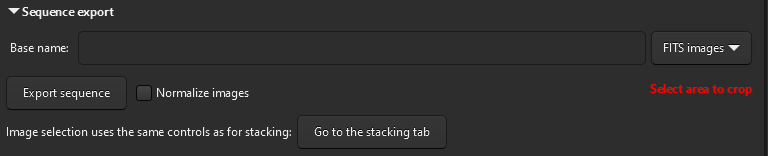
シーケンスをエクスポートするには、名前を指定し、出力形式を設定する。
The Sequence Export tool allows you to export a sequence of images in a
variety of formats. It is particularly useful if you want to export the images
taking into account the registration information contained in the seq file,
with optional cropping and normalization.
With the sequence export function, you can select a sequence to export, choose the file format and compression level for video formats. Siril's sequence export function supports a wide range of image file formats, including FITS (single FITS file or sequence FITS file), TIFF, SER , AVI, MP4 and WEBM and can come in handy when building timelapse.
The button Normalize images allows you to normalize the images with respect to the reference image. The normalization is the same as the one done during the stacking, with the following settings: Additive with scaling, Faster normalization disabled.
Moreover, it is possible to play with the image filtering criteria to exclude or not images according to their quality. A button Go to the stacking tab has been added here, to easily go to the tab that exposes them.
シーケンス情報
All sequence information, registration transformation, statistics and frame
selection are stored in a .seq file saved next to the sequence files. It is
strongly recommended never to edit this file manually because Siril writes
continuously inside it and one wrong character could make the reading of the
sequence corrupt.
One way to clean the content of this sequence file is to go in the Sequence tab and click on Clean Sequence. The choice of what will be cleaned can be defined by clicking on the small arrow next to it.
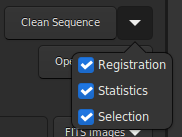
Menu to clean the sequence file.
Sirilコマンドライン
seqclean sequencename [-reg] [-stat] [-sel]