Astro-TIFF
2022年、ASTAPソフトウェア の開発者であるHan Kleijn氏は、TIFF形式を採用し、FITSファイルヘッダーの機能を活かした新しい準標準規格の開発に協力することを申し出ました。こうして、Astro-TIFF フォーマットが誕生しました。
すでに多くの規格がある中で、なぜ新たな規格が必要なのでしょうか?
現在、天体写真で最も広く使われているフォーマットはFITSフォーマットです。このフォーマットは専門の科学者によって開発されたものであり、アマチュアのあらゆる期待に応えるものです。その高い柔軟性ゆえに互換性に関する懸念も一部ありますが、依然として最も推奨されるフォーマットです。
他にも特殊なフォーマットは存在しますが、それらは通常、特定のソフトウェアに紐づいています。たとえば、PixInsightチームが開発したXISFフォーマットなどが挙げられます。このフォーマットは、Sirilでもよくリクエストされますが、PixInsightというプロプライエタリなソフトウェア専用のフォーマットです。そのため、Sirilとの互換性を開発するメリットはほとんどなく、1.4.xシリーズでの読み込み対応のみを行ないました。
したがって、Astro-TIFFの開発は優れた代替案となり得ます。TIFF形式に基づいているため、どのような画像処理ソフトウェアでもファイルを開くことができるからです。
最後に、TIFF形式は(FITS形式と同様に)圧縮に対応しており、これにより画像サイズを小さくすることができます。
仕様 1.0
日付: 2022-06-21
Files are following the TIFF 6.0 specification including supplement 2 fully.
The FITS header is written to the TIFF baseline tag Image Description. Code 270, Hex 010E.
The header is following the FITS specification except that that the lines can be shorter then 80 characters and lines are ending with either CR+LF (0D0A) or LF (0A).
First line in the description is the first header line and starts with
SIMPLE. The last line of the header starts withEND.
Recommendations
TIFFtag_orientation=1(left-top) Orientation is following the conventions. PixelFITS_image[1,1]is left-bottom.TIFF_image[0,0]is left-top. These pixels are first written or read from the file. So when writing a FITS image into TIFF preserving the orientation for the user, the first pixel to write isFITS_image[1,NAXIS2].TIFFtag_compression=8(Deflate) or 5 (LZW).For greyscale images
TIFFtag_PhotometricInterpretation = 1(minimum value is black, maximum is white).Write all available header keywords.
Notes
This use of TIFF format is intended for 16-bit lights, darks, flats and flat-darks (astronomical images), but can also be used in the 32-bit format. It is possible to convert FITS to TIFF and backwards but the application programmer can decide to export only (write) or only import (read) in Astro-TIFF format.
If an astrometrical (plate) solution is included then it should match with the image orientation.
Some header keywords are redundant like
NAXIS1,NAXIS2,BZEROandBITPIXand are not required. TIFF image dimensions and type are leading.The de-mosaic pattern specified in the header should match with the image orientation.
The header will be visible in many image manipulation programs.
Example of an Astro-TIFF header that looks just like a FITS file header:
SIMPLE  =                    T / file does conform to FITS standard
BITPIX  =                  -32 / number of bits per data pixel
NAXIS   =                    2 / number of data axes
NAXIS1  =                 6248 / length of data axis 1
NAXIS2  =                 4176 / length of data axis 2
NAXIS3  =                    1 / length of data axis 3
EXTEND  =                    T / FITS dataset may contain extensions
COMMENT   FITS (Flexible Image Transport System) format is defined in 'Astronomy
COMMENT   and Astrophysics', volume 376, page 359; bibcode: 2001A&A...376..359H
BZERO   =                    0 / offset data range to that of unsigned short
BSCALE  =                    1 / default scaling factor
DATE    = '2022-12-14T16:05:47' / UTC date that FITS file was created
DATE-OBS= '2022-05-06T20:29:20.019000' / YYYY-MM-DDThh:mm:ss observation start,
INSTRUME= 'ZWO CCD ASI2600MM Pro' / instrument name
OBSERVER= 'Unknown '           / observer name
TELESCOP= 'iOptron ZEQ25'      / telescope used to acquire this image
ROWORDER= 'TOP-DOWN'           / Order of the rows in image array
XPIXSZ  =                 3.76 / X pixel size microns
YPIXSZ  =                 3.76 / Y pixel size microns
XBINNING=                    1 / Camera binning mode
YBINNING=                    1 / Camera binning mode
FOCALLEN=              370.092 / Camera focal length
CCD-TEMP=                 -9.8 / CCD temp in C
EXPTIME =                  120 / Exposure time [s]
STACKCNT=                  126 / Stack frames
LIVETIME=                15120 / Exposure time after deadtime correction
FILTER  = 'Lum     '           / Active filter name
IMAGETYP= 'Light Frame'        / Type of image
OBJECT  = 'Unknown '           / Name of the object of interest
GAIN    =                  100 / Camera gain
OFFSET  =                   50 / Camera offset
CTYPE1  = 'RA---TAN'           / Coordinate type for the first axis
CTYPE2  = 'DEC--TAN'           / Coordinate type for the second axis
CUNIT1  = 'deg     '           / Unit of coordinates
CUNIT2  = 'deg     '           / Unit of coordinates
EQUINOX =                 2000 / Equatorial equinox
OBJCTRA = '09 39 54.932'       / Image center Right Ascension (hms)
OBJCTDEC= '+70 00 10.118'      / Image center Declination (dms)
RA      =              144.979 / Image center Right Ascension (deg)
DEC     =              70.0028 / Image center Declination (deg)
CRPIX1  =               3123.5 / Axis1 reference pixel
CRPIX2  =               2088.5 / Axis2 reference pixel
CRVAL1  =              144.979 / Axis1 reference value (deg)
CRVAL2  =              70.0028 / Axis2 reference value (deg)
CD1_1   =         -0.000580606 / Scale matrix (1, 1)
CD1_2   =         -4.12215e-05 / Scale matrix (1, 2)
CD2_1   =         -4.11673e-05 / Scale matrix (2, 1)
CD2_2   =          0.000580681 / Scale matrix (2, 2)
PLTSOLVD=                    T / Siril internal solve
HISTORY Background extraction (Correction: Subtraction)
HISTORY Plate Solve
END
SirilでAstro-TIFFを保存する
Sirilでは、名前を付けて保存 をクリックした際の保存ダイアログでTIFF形式を選択することで、Astro-TIFFファイルを保存できます。TIFFダイアログのドロップダウンリストから、標準のTIFF形式かAstro-TIFF形式のいずれかで保存するかを選択できます。後者がデフォルトの形式です。
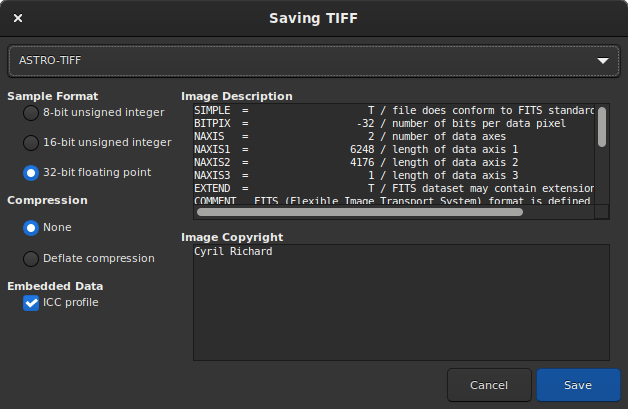
Save Dialog with Astro-TIFF option
Sirilコマンドライン
savetif filename [-astro] [-deflate]
サンプルファイル
Sirilによって作成されたAstro-TIFFファイル (32ビット、非圧縮)。
Sirilによって作成されたAstro-TIFFファイル (32ビット、圧縮済み)。