画像情報ウインドウ
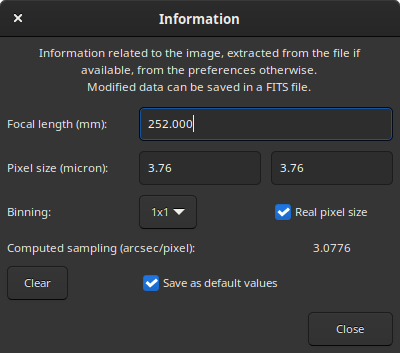
This window provides information about what is known about the sampling of the opened image. The sampling, sometimes also called resolution or scale, indicates how much angle of the sky is seen in one pixel, as seen through the instrument. It depends on two things: the focal length of the instrument and the pixel size of the sensor, itself depending on the binning mode.
FITSヘッダーにこの情報が含まれていることがあります。その場合、このウインドウに表示されるのはその値です。画像メタデータにこの情報が含まれていない場合、つまり撮影ソフトウェアがこの情報を知らなかった場合、あるいは単にファイル形式がこの情報をサポートしていない場合でも、このダイアログは利用可能で、デフォルト値 が入力されます。修正することができ、例えばFWHMをピクセルの代わりに秒角で表示するなどのサンプリング情報を必要とするSirilの様々な操作で使うことができます。
Default values are no binning (1x1), and a focal length and a pixel size stored in the settings. The values stored in the settings can be set from this dialog by activating the Save as default values button before clicking on Close. They can also be set by performing an astrometric resolution on the image, also called plate solving, if the option to update the default values when a result is found is enabled in the preferences.
このウインドウに表示された値は、現在読み込まれている画像に保存され、この画像が FITS として保存されている場合は、FITS ヘッダーに保存されます。
Binning management can take two forms depending on the acquisition software: the real pixel size is given but has to be multiplied by the binning (when Real pixel size is checked), the already multiplied pixel size is given (when unchecked).