Pixel Math
One of the most powerful tools in Siril is the Pixel Math. It allows you to manipulate the pixels of the images using mathematical functions. From simple addition or subtraction, to more advanced functions, like MTF, Pixel Math is a perfect tool for astronomical image processing.
This page aims to describe the tool entirely, to see detailed examples, please refer to the excellent tutorial on the site.
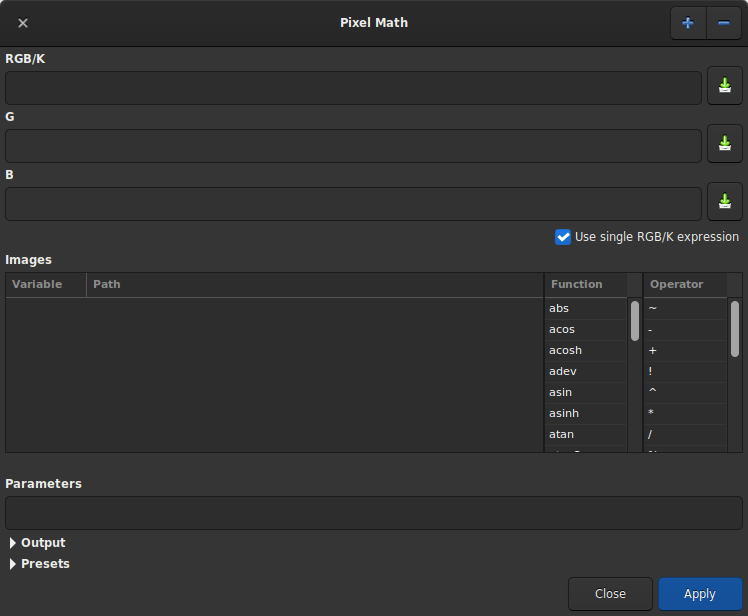
Pixel Math dialog box as shown at opening
The window is divided into 5 parts.
The first one, including 3 text zones receiving the mathematical formulas. Only the first one is used if you want to produce a monochrome image. Uncheck the Use single RGB/K expression button to produce RGB output.
The second is the variables area with the selection of Functions and Operators. Each variable is an image that must be loaded beforehand with the + button. You can click on the desired function and/or operator to make it appear in the formula entry to make it appear in the formula entry.
The third, the parameters field, allows the user to define parameters that are separated by
,. For example, if you set parameters with the expressionfactor=0.8, K=0.2, all the occurences offactorandKin the formula above will be replaced by 0.8 and 0.2 respectively.Ha * factor + OIII * Kwould therefore evaluate toHa * 0.8 + OIII * 0.2.
Pixel Math parameters box
The output field is reserved for scaling the image within a given range and to enable or not the Sum exposure time. This last option gives the user the option of summing or not the exposures of individual images, storing the result in the FITS header. One need to expand the frame before using it.
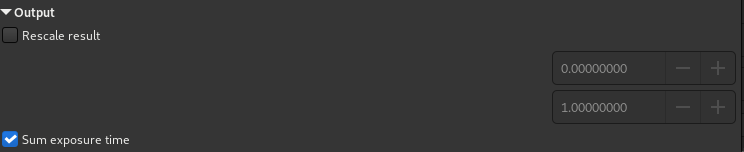
Pixel Math rescale box
Finally, the presets area allows the user to reuse previously saved formulas with the button to the right of the formula areas. One need to expand the frame before using it. Double-click on the formula to copy it to the right entry.

Pixel Math presets
使用方法
Name of variables
By default it is possible to load 10 images simultaneously. Each image is given
a variable name starting with I followed by a number from 1 to 10. However, if
the loaded image contains the keyword FILTER, then the value of the latter
becomes the default variable name. Of course it is always possible to change it
by double clicking on it.

It is possible to change the name of the variable.
$T is a reference to the current image, meaning the image on which the
PixelMath operations will be applied.
小技巧
It is possible to use the currently loaded image by using the $T token.
Note, however, that unlike other programs, the expression $T[i], with
i=0,1,2, is not recognized.
Examples
Let's take a monochrome image of galaxies This is a linear data seen through the autostretch view.
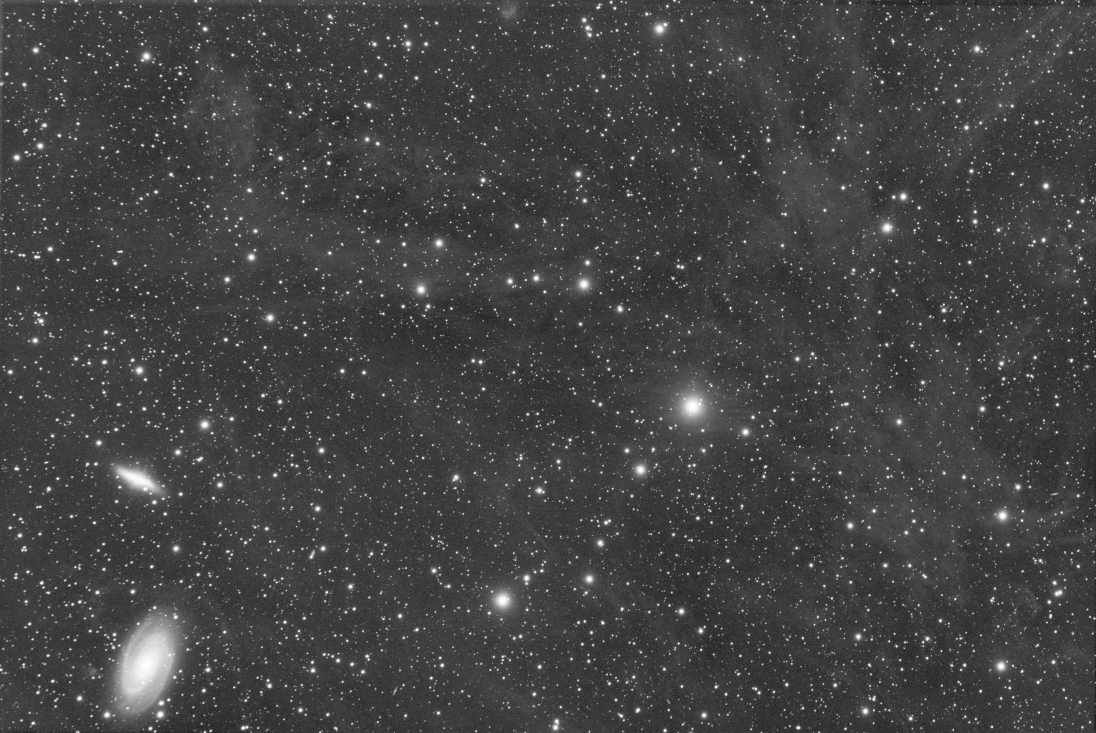
Original image.
The following expression:
iif(Image>med(Image)+3*noise(Image), 1, 0)
will produce a star mask.
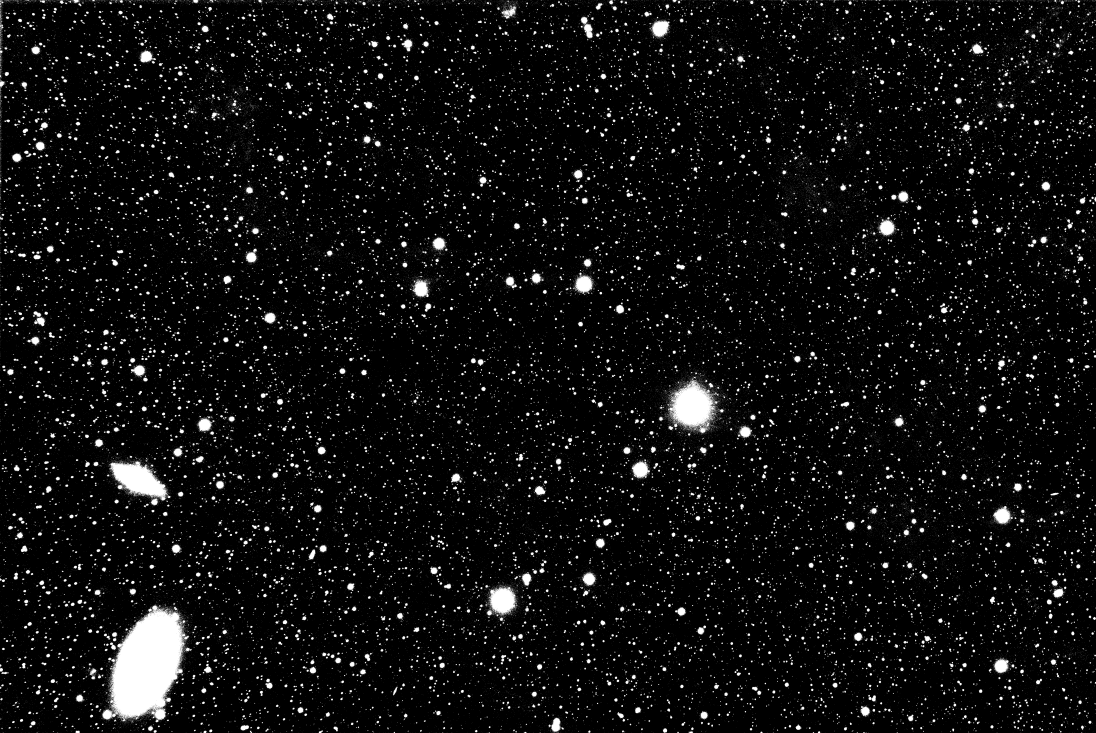
After the formula above.
Siril command line
pm "expression" [-rescale [low] [high]] [-nosum]
Functions
There are two types of functions. Those that apply directly to the pixels and those that apply to the entire image (such as the statistics functions).
Function |
Use case |
Definition |
|---|---|---|
abs |
abs ( x ) |
Absolute value of x. |
acos |
acos ( x ) |
Arc cosine of x. |
acosh |
acosh ( x ) |
表达式x的双曲反余弦。 |
asin |
asin ( x ) |
表达式x的反正弦. |
asinh |
asinh ( x ) |
Hyperbolic arc sine of x. |
atan |
atan ( x ) |
Arc tangent of x. |
atan2 |
atan2 ( y, x ) |
表达式y/x的反正切. |
atanh |
atanh ( x ) |
Hyperbolic arc tangent of x. |
ceil |
ceil ( x ) |
对x向上取整。 |
cos |
cos ( x ) |
Cosine of x. |
cosh |
cosh ( x ) |
表达式x的双曲余弦. |
e |
e |
The constant e=2.718282... |
exp |
exp ( x ) |
Exponential function. |
fac |
fac( x ) |
Factorial function. |
iif |
iif( cond, expr_true, expr_false ) |
Conditional function (or inline if function).
Returns expr_true if cond evaluates to nonzero.
Returns expr_false if cond evaluates to zero.
|
floor |
floor ( x ) |
小于等于x的最大整数. |
ln |
ln ( x ) |
自然对数. |
log |
log ( x ) |
Base-10 logarithm of x. |
log10 |
log10 ( x ) |
Base-10 logarithm of x. |
log2 |
log2 ( x ) |
Base-2 logarithm of x. |
max |
max ( x, y ) |
最大值函数. |
min |
min ( x, y ) |
最小值函数. |
mtf |
mtf ( m, x ) |
x的中间调传递函数 (MTF)其中间调平衡参数 m 在[0, 1] 范围内。 |
ncr |
ncr ( x, y ) |
Combinations function. |
npr |
npr ( x, y ) |
Permutations function. |
pi |
pi |
The constant π=3.141592... |
pow |
pow ( x, y ) |
Exponentiation function. |
sign |
sign ( x ) |
Sign of x:
\(+1\) if \(x > 0\)
\(−1\) if \(x < 0\)
\(\;0\) if \(x = 0\).
|
sin |
sin ( x ) |
Sine of x. |
sinh |
sinh ( x ) |
Hyperbolic sine of x. |
sqrt |
sqrt ( x ) |
Square root of x. |
tan |
tan ( x ) |
Tangent of x. |
tanh |
tanh ( x ) |
Hyperbolic tangent of x. |
trunc |
trunc ( x ) |
表达式x的整数部分(小数全舍). |
Function |
Use case |
Definition |
|---|---|---|
adev |
adev ( Image ) |
图像的平均绝对偏差。 |
bwmv |
bwmv ( Image ) |
Biweight midvariance of the image. |
height |
height ( Image ) |
Height in pixels of the specified image. |
mad |
mad ( Image ) |
Median absolute deviation of the image. The use of mdev is also possible. |
max |
max ( Image ) |
Pixel maximum of the image. |
平均数 |
mean ( Image ) |
图像的平均数。 |
med |
med ( Image ) |
Median of the image. The use of median is also possible. |
min |
min ( Image ) |
Pixel minimum of the image. |
noise |
noise ( Image ) |
Estimation of Gaussian noise in the image. |
sdev |
sdev ( Image ) |
图像的标准差。 |
width |
width ( Image ) |
Width in pixels of the specified image. |
Operators
运算符 |
Use case |
Definition |
|---|---|---|
~ |
~x |
Pixel Inversion operator. |
- |
-x |
一元减法(符号变化)。 |
+ |
+x |
一元加法。 |
! |
!x |
Logical NOT operator. |
^ |
x ^ y |
Exponentiation operator. |
* |
x * y |
Multiplication operator. |
/ |
x / y |
Division operator. |
% |
x % y |
求模。 |
+ |
x + y |
Addition operator. |
- |
x - y |
Subtraction operator. |
< |
x < y |
小于。 |
<= |
x <= y |
Less Than Or Equal relational operator. |
> |
x > y |
大于。 |
>= |
x >= y |
Greater Than Or Equal relational operator. |
== |
x == y |
等于。 |
!= |
x != y |
Not Equal To relational operator. |
&& |
x && y |
逻辑与。 |
|| |
x || y |
Logical OR operator. |